
Working with AI: Finding the Right Tool for the Job
Practical Tips for Using AI and How to Choose the AI Right Tools

There are two sides to AI.
On one hand, it serves as a bastion of human ingenuity and progress, allowing us to reach new heights at speeds that were never before possible.
We see a team of archaeologists and computer scientists from Israel who have developed an AI-powered system that can translate ancient Akkadian cuneiform into English almost instantly. By training the AI on digitized tablets, it recognizes patterns in the symbols and matches them to known translations, drastically speeding up a task that once took human experts years.
Meanwhile, NASA’s Jet Propulsion Laboratory uses AI to navigate Mars rovers like Perseverance, which autonomously picks its path across rocky terrain, avoiding obstacles faster than Earth-based commands could.
Even in creative fields like my own, as an experience designer, AI has revolutionized the way I work, allowing me and my team to work at speeds and produce renderings at rates that would have been impossible without it.
When it comes to working with AI, it sometimes feels like the sky’s the limit.
But, on the other hand…
We have all experienced “those” moments with AI.
Perhaps you have gone to generate a simple image such as “3 rows of people sitting in stacked chairs within an auditorium,” and you received—what I like to call—an AI oddity such as this one

This is an output that I received just the other day. I think I may have seen a preview of Wes Anderson’s next horror film.
Or, on another occasion, I uploaded a spreadsheet of a budget to ChatGPT and asked it to organize the columns based on different categories, only for the results to list numbers that were nonexistent within the document.
Good thing I double-checked them…
Luckily I caught this error before moving forward, but in the case of Mata v. Avianca Airlines in 2023, a New York attorney used ChatGPT to draft a legal motion for a case against Avianca Airlines. Then, unfortunately for the lawyer, the language model generated citations to nonexistent court cases, complete with fabricated judicial opinions and quotes.
Now, if this were purely used for research or as a jumping-off point, no harm would have been done. But before verifying any of this information, the attorney submitted the motion to federal court, assuming the references were legitimate. After all, how could AI make a mistake?
A judge later flagged the errors, noting the cases didn’t exist in any legal database and the attorney was promptly sanctioned.
Truly unfortunate indeed.
Now, we don’t bring up these cases of AI’s failings to claim that we should lock it away and never use it again. No, we bring them up merely as a word of caution.
AI is a tool much like any other, and like any tool, there are certain tasks that it can complete very effectively and others that it can’t. More often than not, when AI stumbles, it’s not the tech that’s to blame—it’s the user who doesn’t grasp what it can and cannot handle.
AI is a tool, plain and simple. Much like a hammer is fantastic for pounding nails or smashing things to bits—AI is built to accomplish certain tasks. But if you take that same hammer to cut a piece of wood, you’d be better off choosing a saw instead.
From image generation to working with language models, AI has its strengths and its limitations. Today, we’ll walk through these two use cases and explore how they shine—and where they stumble—in real-world applications.
IMAGE GENERATION
Image generation has completely changed how we work and has eliminated our need for subscriptions to stock houses. And while each program—from Midjourney to Meta, our preference being Midjourney due to its strength in stylization—differs in what it can achieve, their overall strengths and weaknesses remain very similar.
Image generation is all about achieving a consistent output, and by adhering to the AI’s strengths, you can be sure to achieve what you are looking for. On the other hand, if you try to force it to do something that it is not currently designed to do, while you may eventually be able to achieve something you are looking for, it's often better to come up with another creative solution.
So, what are the strengths and weaknesses of AI image generation?
There are a number of things that it excels at and is able to do consistently:
Composition: No matter the prompt, AI images will nearly always be generated with an interesting composition because the AI is trained to optimize visual balance and harmony based on vast datasets of artistic principles. In other words, even if the output is not what you are looking for, at the very least, you can be guaranteed that it will be arranged in an interesting composition.
Color Theory: AI image-generating programs excel when you provide them with specific colors to work with. And, as color theory is a science, the AI is able to balance different tones and colors together extraordinarily well.
Single Subjects: AI images work best and are the most consistent when generating only a single subject. The more subjects added to the prompt, the more likely that the AI will begin to blend them together or omit them.
Static Scenes: Again, it’s all about consistency. While you can certainly generate scenes with dynamic movement, the images, in general, will be more consistent and of higher quality when generating a static image.
Replicating Specific Styles: From replicating the specific styles of artists like Salvador Dali or more generic styles like “Pixar” or “painterly with visible brush strokes,” AI excels when you provide it with specific directions on how to depict the image. One of the reasons we prefer Midjourney is because it is particularly good at replicating styles.
Representing a Tone: Similar to style, AI excels when you provide it with a tone to work with—whether that be moody, triumphant, or professional, for example.
AI prompts that play to these strengths are more likely to generate consistent and quality outputs. For example, let’s see a prompt for an image that plays into these strengths:
/imagine: A lone figure standing next to a tree with fall colors of red and orange in a field of tall grass at sunset, depicted in the impressionist style of the artist Claude Monet and is painted in a primarily red, orange, and yellow color palette with hints or pink and purple in the sky —ar 16:9

Having worked with the AI’s strengths, we were able to generate a strong image.
Now, let’s take a look at the weaknesses of image generation that will lead to inconsistent outputs:
Complex or Extremely Specific Prompts: The more detail or specificity you add to a prompt, the more likely the AI will struggle to represent everything cohesively while maintaining a unified composition.
Multiple Characters: AI struggles at differentiating multiple characters or subjects in an image, and the more you add, the more likely it will be to combine them or even omit them from the final output.
Text and Symbols: While it is improving, AI is often very inconsistent with representing text and symbols.
Dynamic and Action Scenes: While AI-generated images can portray movement and action, they are generally less consistent than still images.
You’ll Know It When You See It: This refers to specific images or desired outputs that are very difficult to replicate. Often, you won’t know what this might be until you come across it.
For an example of “You’ll Know It When You See It,” one specific image that AI struggles with is roller coasters. As you can see with the following outputs, the AI will often resort to creating what I like to call “death spirals.” Fun, but very likely deadly!
Prompt: /imagine: a wide angle of a roller coaster

Another well-known desired output that it struggles with is representing anything outside what it considers “the ideal” or the “standard.”
For example, all 16 of these images are made with the same prompt:
/imagine: a glass of red wine that is full to the brim but not overflowing on a table with a white tablecloth, photorealistic

As you can see, because the AI has access to so much data showing a wine glass within its “ideal” state, it struggles to represent anything different or outside the ordinary.
Now, as we did with the AI’s strengths, let’s take a look at what happens when we generate a prompt that plays into the AI’s weaknesses.
/imagine: A dolphin swimming inside a wine glass that is full to the brim and in the hands of a giant man riding a roller coaster through a city, the man is sitting next to a robot with evil eyes and holding a sign that reads “AI IS THE FUTURE.” The image is depicted in an incredibly photorealistic style —ar 16:9
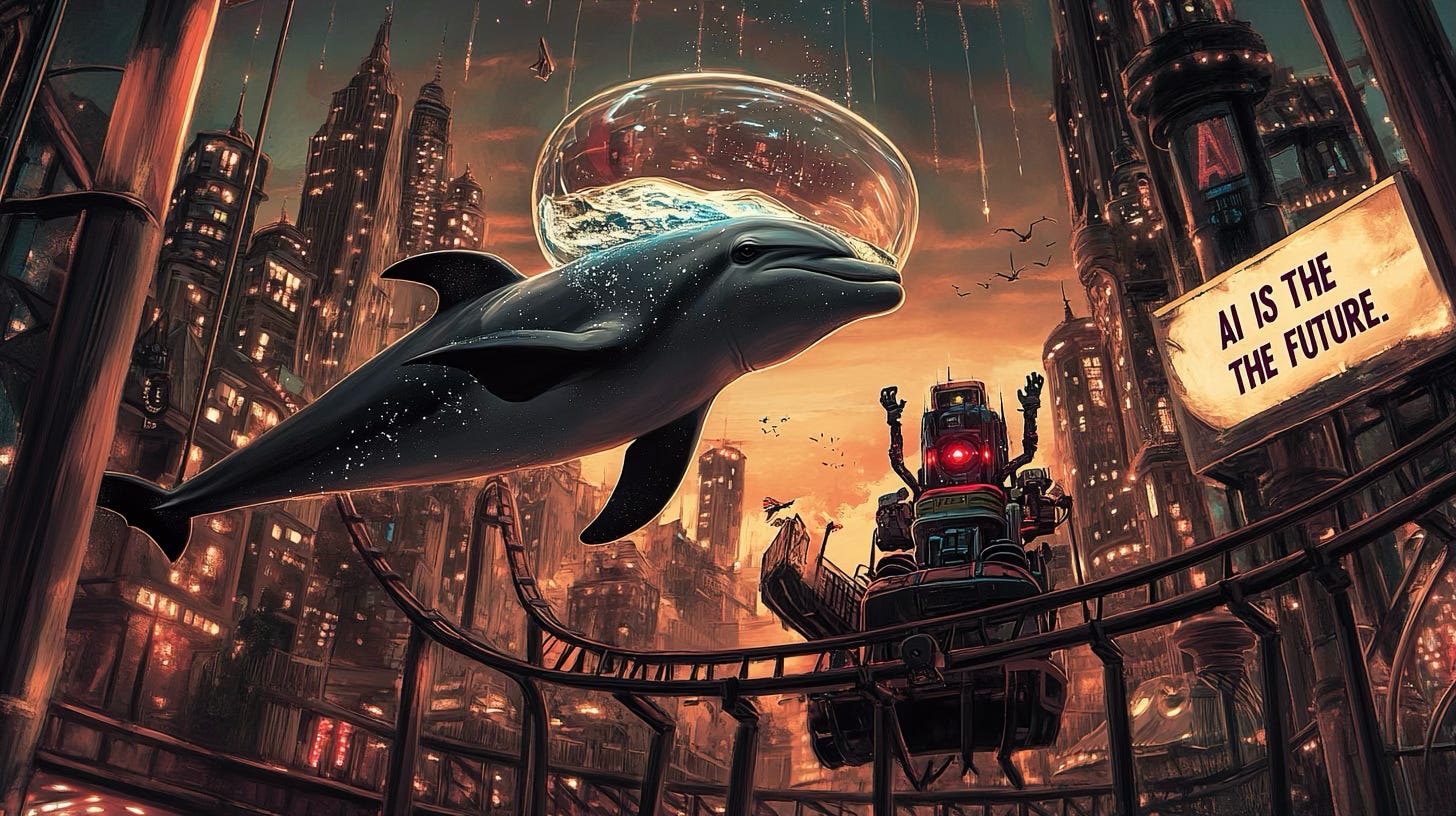
Funnily enough, the text is one of the only things that this output got right…minus the extra “THE.”
The good news is that image generation is improving every day—but if you are to use it effectively today, these are the strengths and weaknesses that you need to keep in mind. These weaknesses reveal a pattern that informs how we should approach AI tools:
The more you add, the more you lose—SO KEEP IT SIMPLE!
LANGUAGE MODELS:
While image generation has its own set of rules, language models come with their own strengths and quirks.
From ChatGPT to Grok, there are a number of language models to choose from, though each share similar strengths and weaknesses that you should know before you work with any of them. Let’s take a look at those now, starting with their strengths:
Summarization and Simplifying: More than anything else, language models excel at analyzing large amounts of information—and doing so incredibly quickly. And don’t forget, this works with images and files as well. Whether you need to catch up on a long email chain, identify weaknesses in a budget produced in an Excel document, or even create an executive summary of a detailed infographic, language models can help you do this faster than ever. As always, you’ll need to double-check its work, but get started and you’ll find out very quickly how you can utilize these strengths.
Brainstorming and Ideation: Stuck on coming up with a list of ideas? Language models can help to get you started quickly and serve as a jumping-off point. They can churn out ideas for blog titles, marketing slogans, or gift ideas for corporate events—often with surprising variety. Give it a number of ideas to generate, like, “Suggest 10 taglines for a new ramen shop in downtown Memphis,” and you’ll get a solid list to build on. While all the ideas won’t be winners, it can easily serve as a starting point.
Programming Assistance: Whether you’re a coder or just trying to get something done in Microsoft Excel, these models can save you when you’re stuck. Need a Python script to sort data? Ask, and it’ll deliver—usually with comments explaining the steps. Debugging’s easier too—just paste your code and say, “Fix this.” Again, it’s not flawless, but it beats endless searches through Reddit forums and relying on Google searches.
Editing and Proofreading: If you struggle with writing—whether that be grammar slips, awkward phrasing, or clunky sentences—language models can help to smooth them out. Upload a draft, and it’ll tighten your wording or catch typos. Whether you need to polish an email to an important client or use it to catch errors in an article for Substack (not that I would ever do anything like that), AI is there for you.
Locating Sources: If you’re looking for sources on a specific topic, AI can help you to find them. Whether you’re asking for a list of quotes from Abraham Lincoln or articles detailing the history of an important client, simply ask the AI to provide links to the sources it used to come up with its answers and it will provide them to you.
Research Assistance (General Information): When it comes to sharing information on broad topics or giving you a quick summary, there’s nothing better than AI to get you started. They can summarize AI ethics or quantum computing basics in plain English, sparing you the academic slog. Before diving into the details of research, AI can help to give you the broad information that you need to know and help spark other ideas. Again, just be sure to have it cite its sources.
These strengths make language models a go-to for speed and creativity—when you play to their sweet spots.
But, as impressive as they are, they’re not perfect. Let’s dive into their weaknesses:
Overconfidence and Hallucination: Language models are like your crazy uncle—you know the one—they know a lot and want to answer all your questions. However, there's a solid chance they might be making things up just to mess with you. Often, the answers will sound dead certain while being totally off-base. Take the Mata v. Avianca case—ChatGPT churned out fake legal citations, and the attorney took the bait. Confidence doesn’t equal correctness—always check the output, especially when looking at information you’re not already familiar with.
Reasoning, Logic, and Spatial Problem Solving: Don’t expect deep critical thinking from AI. Ask it to solve a logic puzzle like, “If A is taller than B, and B is taller than C, who’s tallest?” and it’ll likely manage. But throw in a tricky riddle or a multi-step problem, and it might stumble. It’s better at parroting patterns than reasoning from scratch. After all, AI does not experience the world like we do, so when it comes to spatial problem-solving, it might get stuck.
Tasks Requiring Real-Time or Current Information: AI usually can’t help you with the latest news or weather—at least not yet. Most models have a knowledge cut-off or limited live data access. Even with updates, they’re not built for real-time feeds. When you need real-time or live information, it’s better to go with Google or another search engine.
Lack of Persistence and Memory: If you have ever tried a long back-and-forth with AI, you may have noticed that it started to forget previous things you have specified. Ask it to analyze a document, then follow up three questions later, and it might forget what you started with. Like humans, it can forget the mental thread you’ve been working on. Keep it focused and keep reminding it what you are talking about, or you might lose it along the way.
Difficulty with Ambiguous Prompts: Vague requests trip up the AI. Say, “Tell me about stuff,” and you’ll get a confused ramble. Even “Summarize this” while uploading a document might leave it confused on what to focus on. Clarity is king—spell out what you want, or brace yourself for confused or sub-par answers. AI is like that scene in the 1996 movie Phenomenon where John Travolta’s character keeps asking the doctor testing his intelligence to “Be specific Bob.” You can watch that scene here:
Difficulty Interpreting Complex Inputs: In the complete opposite direction, if you are too specific or require too much, the AI might not be able to handle your directions. Throw it a messy, convoluted document—like a rambling email with five tangents—and it might miss the point. Simple inputs get better results.
Highly Technical or Specialized Tasks: If you need a dissertation on obscure biochemistry or a detailed patent analysis, AI is probably not the tool for you—it’ll give you a surface-level take at best. Stick to general knowledge or pair it with an expert to get the best results.
So, what’s the key to making language models work for you?
It’s all about communication.
Think of it like giving directions to a brilliant but slightly distracted assistant. If you’re clear, concise, and specific—say, “Summarize this 10-page report into five bullet points”—you’ll strike gold. But mumble some vague directions or bury them in a mess of tangents, and you’ll end up with gibberish—or worse, a confident lie.
Communication is the bridge between their strengths and your success—build your prompts well, double-check the results, and you’ll unlock the full potential of language models.
THE RIGHT TOOL FOR THE RIGHT JOB
AI is a marvel—there’s no denying it—but it isn’t a magic wand.
It’s a toolbox packed with hammers, saws, and screwdrivers—each built for a purpose. Image generation shines when you keep it simple and stumbles when you pile on complexity. Language models thrive on sharp prompts and broad summaries but falter with ambiguity or real-time demands.
The stumbles aren’t failures of the tech; they’re missteps in how we use it.
So, pick the right tool for the job. Need a vivid Monet-style landscape? Midjourney is your hammer. Need a quick summary? Grok or ChatGPT can become your screwdriver. But if you’re chasing real-time data or a PhD-level thesis, reach for older tools like Google or books by experts.
AI’s power lies in our hands. Understand its strengths, respect its limits, and wield it wisely.
That’s how we can use it to keep moving forward!
Joel Thatcher is a creative director at Creative Principals, an experience design firm. His work includes the newly renovated Delta Flight Museum, Indianapolis Motor Speedway and the AI-powered GAME ON! Experience at the College Football Hall of Fame.
Hey Joel! It’s Lisa Jey - we met when I was at Proto. Let’s connect!